|
Frequently asked questions |
Scroll |
2.CloudSAMS importing teacher data from e-Services Portal
From the left menu, click "Import and Export > Export Teacher Data to CloudSAMS", choose the teachers whose data need to be exported, set an encryption key, and click "Export to File". The exported file can be imported to CloudSAMS.
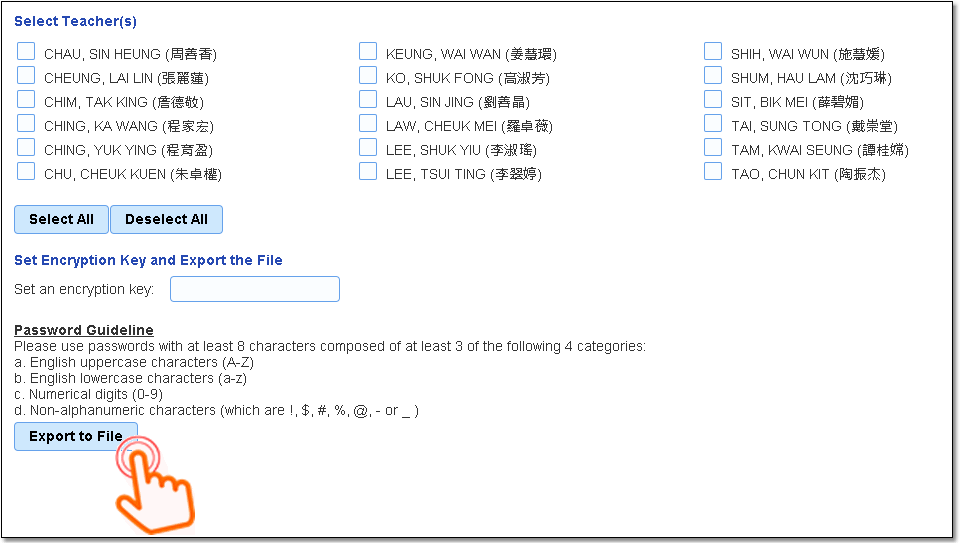

•If you have forgotten the encryption key, you have to export another file.
•For enquiries concerning CloudSAMS files, please contact your CloudSAMS school liaison officer, or visit https://www.edb.gov.hk/en/sch-admin/admin/sch-it-systems/cloudsams/index.html.
Related information
 Teacher Desk
•Create e-Services Portal account
•"Teacher Profile > "Serving Schools" shows previously served school
 School Desk
•Manage the appointment records of teachers teaching in both secondary section and primary section
•Appointment records of teachers whose salaries are from different sources of funding