1. How to update teachers' appointment information?
The system provides the following two ways to update teachers’ appointment information:
1.From the left menu, select "Appointment Management" > "Updating of Appointment";
2.Select the teacher whose appointment information requires updating;
3.Input the appointment information and click "Save".
|
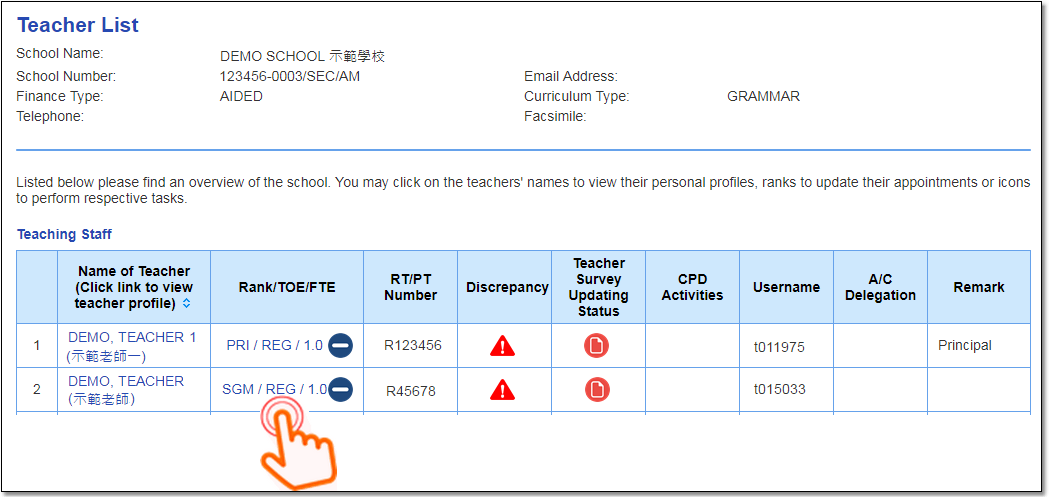
1.From the left menu, select "School Profile" > "Teacher List";
2.Click the "Rank/TOE/FTE" of the teacher whose appointment information requires updating. This opens the "Updating of Appointment" window;
3.Input the appointment information and click "Save".
|
Related information:
|
Questions in the same category:
1.How to update teachers' appointment information? 2.The school has both secondary section and primary section. How to manage the appointment records for teachers teaching in both sections? 3.A teacher is paid out of different sources of funding, how should the appointment record be done? 4.What are the definitions of "full-time" and "part-time" kindergarten teachers? 5.What should be done for a teacher taking a prolonged leave or on secondment to the Education Bureau (EDB)? 6.What should be done for a departing teacher? 7.How to restore terminated employment records? 8.How do I update a kindergarten teacher's "Monthly Salary and Employment Information"? 9.How do I determine the proportion relative to full-time work for part-time kindergarten teacher? 10.How do I update the type of learning activities a kindergarten teacher is specifically responsible for? |